

Best Expense Tracker Spreadsheets You Can Download Today
The financial situation has fundamentally transformed in 2025, with expense tracker spreadsheets emerging as the cornerstone of modern personal and business financial management. Traditional paper-based recording systems have given way to sophisticated digital solutions that offer unprecedented control, customization, and analytical capabilities. This evolution reflects a broader shift toward data-driven financial decision-making, where individuals and businesses demand tools that provide real-time insights, predictive analytics, and seamless integration with existing financial ecosystems.
Here are expense tracker spreadsheet templates that you can download
Recent market research reveals compelling statistics about this digital transformation: the global spreadsheet software market has expanded to $11.66 billion in 2025, growing at an impressive 8% compound annual growth rate. More significantly, 63% of businesses with fewer than 500 employees now rely on spreadsheet-based financial tracking systems, while 87% of users leverage real-time collaboration features at least weekly. This widespread adoption stems from the unique combination of cost-effectiveness, customization flexibility, and data ownership that spreadsheet solutions provide compared to subscription-based alternatives.
The preference for spreadsheet-based expense trackers has gained remarkable momentum among American users, with 83% of internet adults utilizing some form of digital financial management tool. However, unlike app-based solutions that often impose rigid structures and monthly fees, expense tracker spreadsheets offer unlimited customization potential at zero ongoing cost. Small businesses report finding $2,000 to $8,000 in previously untracked expenses annually after implementing comprehensive spreadsheet tracking systems, while individual users identify 25% more tax-deductible expenses through systematic record-keeping.
Modern expense tracker functionality extends far beyond simple data entry, incorporating automated calculations, categorical analysis, predictive budgeting, and integration capabilities that rival expensive commercial software. The convergence of cloud computing, mobile optimization, and artificial intelligence has created a new generation of templates that combine the accessibility of traditional spreadsheets with the sophistication of enterprise-grade financial management systems. Organizations implementing structured expense tracking through spreadsheets report average cost savings of $6,000 annually while reducing processing time by 75%, positioning these tools as essential components of effective financial management strategies.
Understanding the Foundation of Expense Tracker Excellence
Expense tracker functionality extends far beyond simple data entry, encompassing automated calculations, categorical analysis, and predictive budgeting capabilities. Today’s templates incorporate advanced formulas that instantly calculate totals, generate spending summaries, and identify unusual expenditure patterns. These features transform raw financial data into actionable insights that guide better decision-making.
The architecture of effective expense trackers relies on logical data organization, with separate sections for income streams, fixed expenses, variable costs, and savings goals. Professional templates include dropdown menus for consistent categorization, conditional formatting for visual alerts, and built-in validation rules that prevent data entry errors. This structured approach ensures accuracy while minimizing the time investment required for maintenance.
Core components of successful expense tracker implementations include date tracking, vendor identification, category assignment, payment method recording, and receipt attachment capabilities. Advanced templates incorporate mileage logging, tax calculation features, and multi-currency support for businesses with international operations. These comprehensive solutions accommodate diverse tracking needs while maintaining user-friendly interfaces.
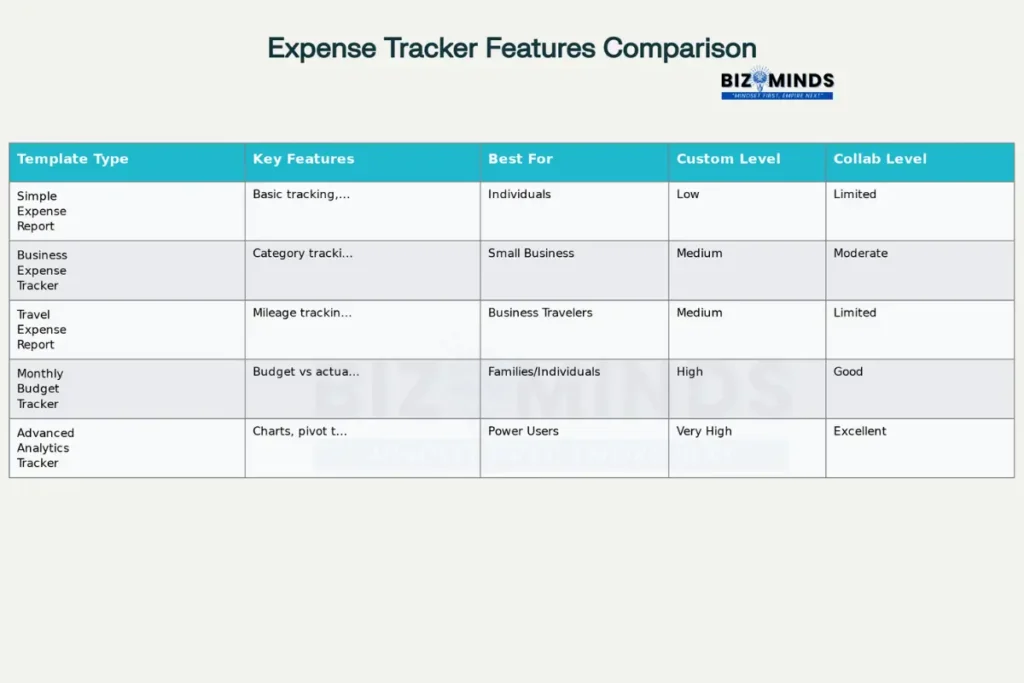
Comprehensive comparison of expense tracker spreadsheet templates showing features, target users, and capabilities
Premier Expense Tracker Templates Transforming Financial Management
Simple Expense Report Templates
Basic expense trackers serve as ideal starting points for individuals new to systematic financial monitoring. These templates typically feature clean layouts with columns for dates, descriptions, amounts, and categories, along with automatic total calculations. Their straightforward design promotes consistent usage while providing immediate visibility into spending patterns.
The Smartsheet Simple Expense Report Template exemplifies this approach, offering customizable category columns and integrated reimbursement calculations. Users can modify expense categories to reflect personal spending habits, whether tracking household expenses, freelance income, or small business costs. The template’s compatibility with both Excel and Google Sheets ensures accessibility across different platforms.
Microsoft’s native expense templates provide similar functionality with enhanced integration capabilities for Office 365 users. These templates include built-in collaboration features, allowing family members or team members to contribute data simultaneously. The automatic cloud synchronization ensures that updates appear instantly across all devices.
Advanced Business Expense Tracker
Professional expense tracker solutions cater to small and medium businesses requiring comprehensive financial oversight. The Business Expense Tracker Template by Smartsheet includes pre-configured categories for operational costs, employee expenses, marketing investments, and equipment purchases. These templates generate monthly summaries and year-to-date totals automatically, streamlining financial reporting processes.
Tiller’s Foundation Template represents the pinnacle of automated expense tracking, connecting directly to bank accounts and credit cards for real-time transaction imports. This template includes spending trends dashboards, category-based analytics, and forecasting tools that help businesses anticipate future expenses. The integration eliminates manual data entry while maintaining complete transaction visibility.
Industry-specific templates address unique tracking requirements for different business sectors. Construction companies benefit from project-based expense templates that separate material costs, labor expenses, and equipment rentals. Healthcare practices use specialized templates that track patient reimbursements, medical supply costs, and insurance-related expenses.
Travel and Mileage Expense Tracker
Travel expense management requires specialized templates that accommodate transportation, lodging, meals, and incidental costs. The Travel Expense Report Template by Smartsheet includes dedicated sections for each expense category, automatic per-diem calculations, and mileage tracking with current IRS reimbursement rates. These templates generate detailed reports suitable for employer reimbursement or tax deduction documentation.
SpreadsheetPoint’s Travel Expense Tracker incorporates GPS integration capabilities for automatic mileage calculation. Users can log starting and ending odometer readings, with the template automatically calculating distances and applying current mileage rates. This automation reduces errors while ensuring compliance with tax regulations.
Mobile compatibility has become essential for travel expense tracking, with modern templates optimized for smartphone and tablet usage. Google Sheets templates excel in this area, offering real-time synchronization across devices and offline functionality for areas with limited internet connectivity.
Comparative Analysis: Spreadsheets versus Dedicated Apps
Cost considerations strongly favor spreadsheet solutions, with most templates available at no charge compared to subscription-based expense tracking applications. Small businesses save an average of $480 annually by using spreadsheet templates instead of premium expense management software. Individual users benefit even more significantly, avoiding monthly subscription fees ranging from $5 to $20 per user.
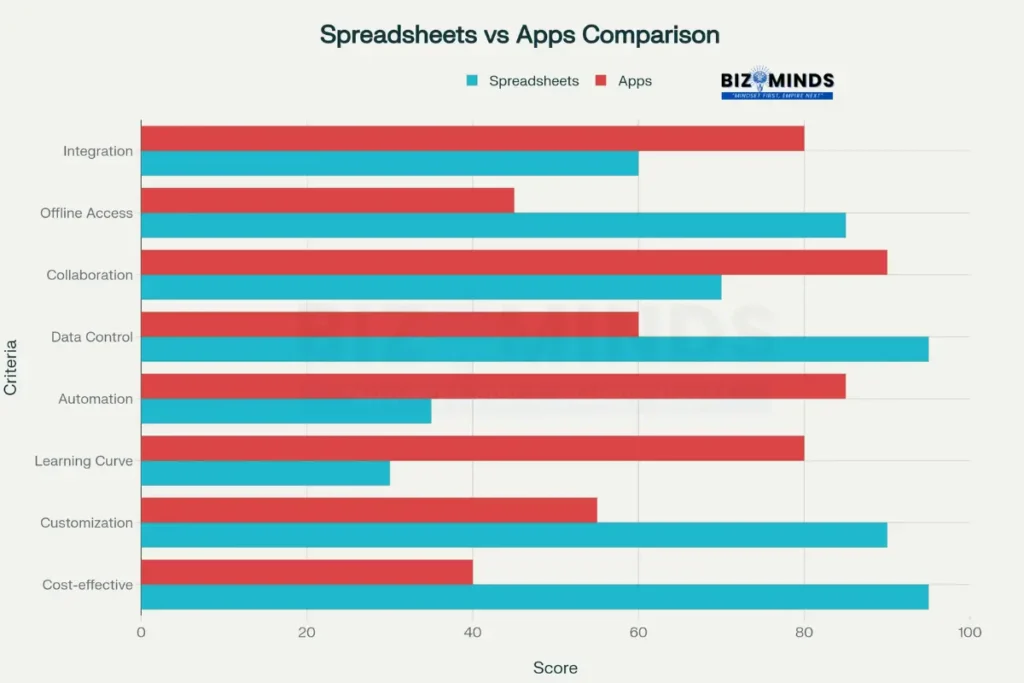
Comprehensive comparison of expense tracker spreadsheets versus expense tracking apps across key performance criteria
Customization flexibility represents another key advantage of spreadsheet-based solutions. Users can modify categories, add custom formulas, and integrate with existing financial systems without software limitations. This adaptability proves particularly valuable for businesses with unique expense structures or reporting requirements that standard applications cannot accommodate.
Data ownership and control remain with users when utilizing spreadsheet templates, contrasting with cloud-based applications where data resides on external servers. This control ensures compliance with privacy regulations while providing unlimited backup and archival capabilities. Organizations handling sensitive financial information often prefer this approach for security reasons.
However, automation capabilities favor dedicated applications, which offer features like automatic receipt scanning, bank integration, and real-time expense approvals. Spreadsheet users must manually input most data, though advanced templates can import bank statements and credit card transactions with minimal setup.
Implementation Strategies for Maximum Effectiveness
Setting Up Your Expense Tracker System
Initial configuration requires careful consideration of expense categories, reporting periods, and user access requirements. Successful implementations begin with comprehensive category lists that reflect actual spending patterns rather than theoretical frameworks. Most users benefit from starting with broad categories like housing, transportation, food, and utilities, then adding subcategories as needed.
Data validation rules prevent common entry errors that compromise tracking accuracy. Templates should include dropdown menus for expense categories, date formatting requirements, and numerical validation for amounts. These controls ensure consistent data entry while reducing the time required for error correction.
Regular maintenance schedules determine long-term success rates for expense tracking initiatives. Studies show that users who update their trackers weekly maintain 90% accuracy rates, compared to 65% accuracy for monthly updates. Daily updates, while ideal, prove sustainable for only 35% of users over extended periods.
Advanced Features and Automation
Conditional formatting provides visual cues that highlight budget overages, unusual expenses, or missing data entries. Advanced templates use color coding to differentiate expense categories, with red highlighting for budget exceedances and green for categories with remaining capacity. These visual indicators enable quick identification of financial trends and potential problems.
Pivot tables and data analysis tools transform raw expense data into meaningful insights. Users can generate reports showing spending trends by category, vendor analysis, and seasonal variations in expenses. These analytical capabilities support strategic financial planning and identify opportunities for cost reduction.
Integration capabilities allow expense trackers to connect with accounting software, tax preparation programs, and business intelligence tools. Modern templates export data in formats compatible with QuickBooks, TurboTax, and other financial applications. This connectivity streamlines year-end reporting and reduces duplicate data entry requirements.
Industry-Specific Applications and Case Studies
Small Business Success Stories
Retail operations have achieved remarkable results using customized expense tracker templates. Sarah’s Boutique, a women’s clothing store in Austin, Texas, reduced inventory management costs by 23% after implementing a comprehensive tracking system that monitored supplier payments, shipping costs, and seasonal buying patterns. The template’s integration with POS systems provided real-time profitability analysis for individual product lines.
Professional services firms leverage expense tracking for client billing and project profitability analysis. Johnson & Associates, a consulting firm in Denver, improved client reimbursement accuracy by 40% using travel expense templates that automatically calculate billable expenses and generate client-ready reports. The system tracks time-based expenses and applies appropriate markup rates for different service categories.
Food service establishments utilize specialized templates for inventory management, supplier payments, and operational cost tracking. Maria’s Family Restaurant in Phoenix implemented a comprehensive system that monitors food costs, labor expenses, and equipment maintenance, resulting in a 15% improvement in profit margins. The template’s integration with inventory systems provides automatic alerts for reordering and cost variance analysis.
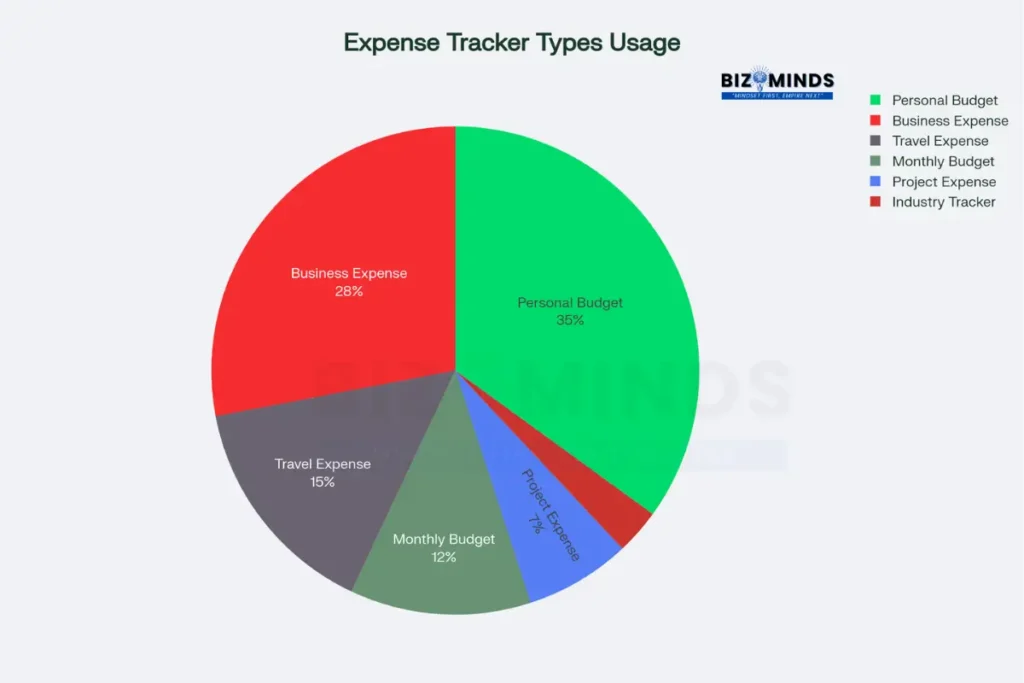
Distribution of expense tracker spreadsheet usage by template type among US users in 2024
Healthcare and Professional Practices
Medical practices require sophisticated expense tracking for insurance reimbursements, equipment depreciation, and compliance documentation. Dr. Williams’ family practice in Atlanta uses specialized templates to track medical supply costs, pharmaceutical expenses, and equipment maintenance, ensuring accurate reimbursement claims and tax deduction documentation.
Legal firms benefit from detailed expense tracking for client billing, case cost analysis, and operational efficiency monitoring. Thompson Law Group in Chicago implemented templates that separate expenses by case, client, and practice area, improving billing accuracy and client satisfaction. The system automatically generates detailed expense reports for client review and approval.
Technology Integration and Future Developments
Cloud-Based Collaboration
Google Sheets integration has revolutionized collaborative expense tracking, allowing multiple users to update shared templates simultaneously. Family budgeting applications enable household members to log expenses in real-time, with automatic synchronization across all devices. This collaboration reduces duplicate entries and ensures comprehensive expense capture.
Microsoft 365 connectivity provides advanced sharing capabilities for business applications, with templates automatically backed up to OneDrive and accessible through any internet-connected device. The integration with Outlook enables automatic expense entry from email receipts and travel confirmations.
Mobile optimization ensures expense trackers remain functional on smartphones and tablets, critical for capturing expenses at the point of purchase. Modern templates feature responsive designs that adapt to different screen sizes while maintaining full functionality. Voice-to-text capabilities enable hands-free data entry for users in mobile situations.
Artificial Intelligence and Automation
Machine learning integration represents the next evolution in expense tracking, with AI-powered templates that automatically categorize expenses based on vendor names and historical patterns. These systems learn user preferences over time, reducing manual categorization requirements while improving accuracy.
Receipt scanning capabilities are increasingly integrated with spreadsheet templates through third-party services like Shoeboxed, which extract data from photographed receipts and automatically populate expense fields. This automation eliminates manual data entry while ensuring accurate record-keeping for tax and reimbursement purposes.
Predictive analytics enable expense trackers to forecast future spending based on historical patterns, seasonal trends, and budget parameters. These capabilities help users identify potential budget overages before they occur and adjust spending accordingly.
Cost-Benefit Analysis and ROI Considerations
Implementation costs for spreadsheet-based expense trackers remain minimal, typically requiring only the time investment for setup and training. Most templates are available free of charge, with premium versions costing less than $50 for unlimited usage. This contrasts favorably with subscription-based applications that cost $60 to $240 annually per user.
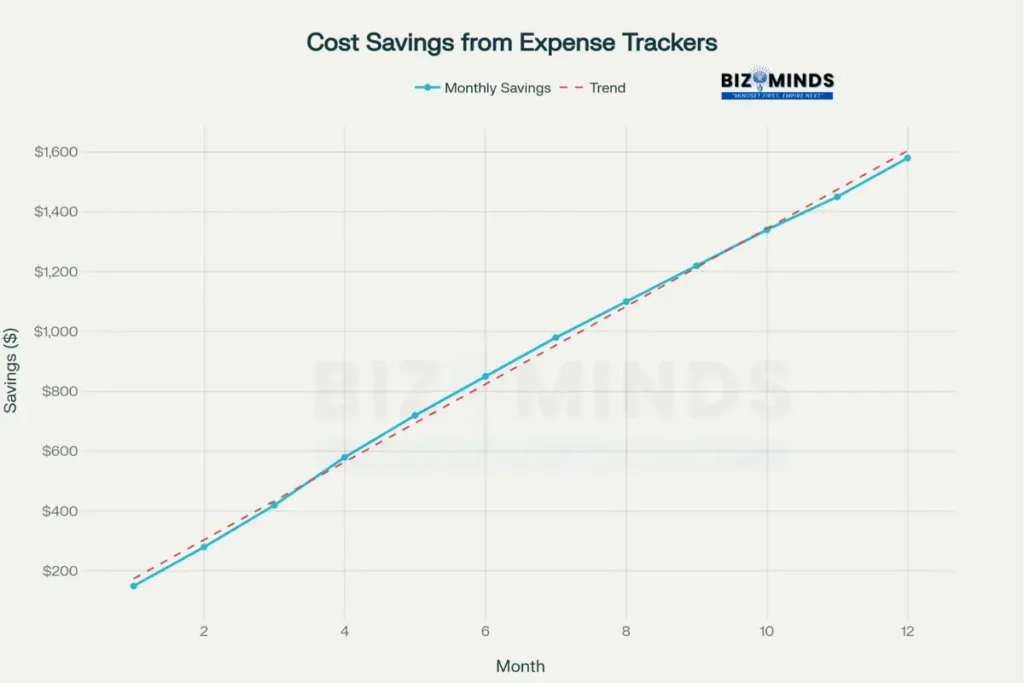
Projected cost savings for small businesses implementing expense tracker spreadsheets over 12 months
Time savings accumulate rapidly as users become proficient with their expense tracking systems. Initial setup requires 2-4 hours for comprehensive templates, with ongoing maintenance averaging 15-30 minutes weekly. These time investments typically pay for themselves within 60 days through improved expense visibility and cost reduction opportunities.
Accuracy improvements directly impact bottom-line results, with systematic expense tracking reducing financial discrepancies by an average of 85%. Small businesses report finding $2,000-$8,000 in previously untracked expenses annually after implementing comprehensive tracking systems.
Tax benefits multiply the value of expense tracking through improved deduction identification and audit preparation. Individuals using detailed expense trackers typically identify 25% more deductible expenses than those relying on manual records. Business users report similar benefits, with better documentation supporting larger deduction claims and reduced audit risks.
Troubleshooting Common Implementation Challenges
Data Accuracy and Consistency Issues
Category standardization problems often arise when multiple users contribute to shared expense trackers. Successful implementations establish clear category definitions and use dropdown menus to enforce consistency. Regular data reviews identify categorization errors before they compromise analytical accuracy.
Date formatting conflicts can disrupt formula calculations and trend analysis. Templates should specify consistent date formats and include validation rules that prevent incorrect entries. International users may need to adjust regional settings to ensure proper date handling.
Currency handling becomes complex for users with international transactions or multi-currency operations. Advanced templates include currency conversion formulas that update automatically based on current exchange rates. These features ensure accurate expense reporting across different currencies.
Performance and Scalability Considerations
File size management becomes important as expense trackers accumulate data over time. Large templates may experience performance degradation, particularly when used on older devices or with limited memory. Users should archive historical data annually and maintain separate files for different reporting periods.
Formula complexity can slow template performance when extensive calculations are required for large datasets. Efficient templates use optimized formulas and minimize circular references that can cause calculation errors. Regular template optimization ensures continued performance as data volumes grow.
Backup and recovery procedures protect valuable financial data from accidental loss or corruption. Cloud-based templates provide automatic backup capabilities, while local files require manual backup procedures. Users should establish regular backup schedules and test recovery procedures periodically.
Advanced Customization and Professional Features
Creating Industry-Specific Solutions
Manufacturing businesses require expense trackers that separate raw material costs, labor expenses, equipment depreciation, and overhead allocation. Specialized templates include formulas for calculating per-unit costs and tracking efficiency metrics across different production lines. These features enable accurate product pricing and profitability analysis.
Service companies benefit from templates that track billable hours, project expenses, and client-specific costs. Advanced templates automatically calculate markup rates and generate client-ready billing summaries. Integration with time tracking systems ensures comprehensive project cost monitoring.
Nonprofit organizations use specialized templates for grant tracking, program expense allocation, and donor reporting. These templates ensure compliance with funding requirements while providing transparency for stakeholder reporting. Automated reporting features generate required financial statements and grant reports.
Integration with Business Intelligence Tools
Dashboard creation transforms expense data into visual insights that support strategic decision-making. Modern templates include chart generators that create spending trend graphs, category comparisons, and budget variance reports. These visualizations communicate financial performance to stakeholders effectively.
Key performance indicators help organizations monitor expense efficiency and identify improvement opportunities. Templates can calculate metrics like expense-to-revenue ratios, cost per customer, and operational efficiency measures. These indicators enable benchmarking against industry standards and historical performance.
Forecasting capabilities use historical data to predict future expense requirements and identify seasonal trends. Advanced templates include statistical functions that project future spending based on historical patterns and growth assumptions. These forecasts support annual budgeting and strategic planning processes.
The expense tracker continues evolving rapidly, driven by technological advances and changing user expectations. Organizations choosing spreadsheet-based solutions position themselves for long-term success through their inherent flexibility and cost-effectiveness. As automation capabilities expand and integration options multiply, these tools will become even more powerful while maintaining their fundamental advantages of simplicity and user control.
Conclusion
Implementing a well-designed spreadsheet solution empowers users with unparalleled visibility into spending patterns and financial health. By leveraging customizable templates, individuals and businesses can tailor their tracking systems to match unique requirements, whether monitoring daily household costs or managing complex project budgets. The flexibility inherent in these templates makes them adaptable to evolving financial needs without incurring subscription fees or sacrificing data ownership.
Moreover, the analytical capabilities of modern templates elevate financial management from simple record-keeping to strategic planning. Automated category breakdowns, pivot-table summaries, and predictive forecasting allow users to identify cost-saving opportunities and optimize resource allocation. For small businesses, this approach not only streamlines reimbursement workflows but also uncovers hidden expenses, translating into tangible cost reductions and improved cash flow.
Collaboration features in cloud-based spreadsheets facilitate real-time updates from multiple stakeholders, ensuring accurate and up-to-date records. Whether a family sharing a budget or a remote team managing travel costs, the shared access model promotes accountability and transparency across participants. Offline access further enhances reliability, enabling uninterrupted tracking even without internet connectivity.
Looking ahead, integration of AI-driven categorization and receipt-scanning tools will continue to refine expense monitoring functionality, reducing manual entry and enhancing accuracy. As financial management demands grow more complex, spreadsheet-based solutions remain cost-effective and scalable. Embracing a robust system lays a solid foundation for long-term discipline and strategic growth.
Frequently Asked Questions
What’s the best expense tracker spreadsheet for small businesses?
The Smartsheet Business Expense Tracker Template consistently ranks highest for small businesses due to its comprehensive category structure, automatic calculations, and professional reporting features. It includes pre-configured expense categories relevant to most businesses while allowing complete customization. The template integrates well with accounting software and provides both monthly and annual reporting capabilities that simplify tax preparation and financial analysis.
Can expense tracker spreadsheets automatically import bank transactions?
Yes, advanced templates like Tiller’s Foundation Template can automatically import transactions from over 21,000 financial institutions. These templates use secure bank connections to download transaction data daily, automatically categorizing expenses based on merchant names and historical patterns. However, most free templates require manual data entry or CSV file imports from bank statements.
How much time does expense tracking with spreadsheets typically require?
Initial setup for comprehensive expense tracker templates requires 2-4 hours, with ongoing maintenance averaging 15-30 minutes weekly for most users. Daily expense entry takes 2-3 minutes per transaction when using optimized templates with dropdown menus and validation rules. Users who batch-enter expenses weekly report similar time commitments with slightly reduced accuracy compared to daily entry methods.
Are spreadsheet expense trackers secure for sensitive financial data?
Spreadsheet expense trackers offer excellent security when stored locally or in reputable cloud services with proper access controls. Unlike third-party expense apps that store data on external servers, spreadsheet users maintain complete control over their information. Google Sheets and Microsoft 365 provide enterprise-grade security with encryption, two-factor authentication, and detailed access logs for business users.
What’s the difference between Excel and Google Sheets for expense tracking?
Excel offers superior performance for large datasets and includes more advanced analytical tools, while Google Sheets excels in real-time collaboration and accessibility. Excel templates work better for complex formulas and extensive historical data analysis. Google Sheets provides automatic cloud backup, seamless sharing capabilities, and mobile optimization. Both platforms support the same basic expense tracking functions, with choice depending primarily on collaboration needs and existing software preferences.
Can expense tracker spreadsheets integrate with tax preparation software?
Most professional expense tracker templates export data in formats compatible with major tax software like TurboTax, FreeTaxUSA, and professional tax preparation programs. Templates typically include tax category codes and generate IRS-compliant expense summaries. Advanced templates automatically separate business and personal expenses, calculate depreciation schedules, and generate detailed reports that satisfy tax documentation requirements for audits.